What Should a WordPress Website Cost for a Small Business in 2026?
WordPress website cost in 2026: honest pricing breakdown from DIY to agency. Find out what a small business site should actually cost and why.
A plain-numbers breakdown of every option from DIY to agency. What each costs, what you actually get, and what most pricing conversations leave out.
By Sheikh Hassaan — Website developer for service businesses
Quick Answer
A professionally built WordPress website for a small service business in 2026 should cost between $400 and $800 from a freelance developer or fixed-price package provider. DIY options run $0 to $300 but carry significant time cost and configuration risk. Agencies start at $1,500 and scale to $25,000 or more. The right option depends on what the site needs to do for the business, not on minimizing the upfront number.
Why WordPress Pricing Is So Confusing
Search 'how much does a WordPress website cost' and you will find answers ranging from free to $50,000. Both are technically accurate. Neither is useful. The range exists because WordPress website is not a standardized product. It is a category that covers everything from a one-page freelancer portfolio to a complex multi-location booking platform with custom integrations.
The confusion is compounded by how pricing is presented. Agencies quote project fees that exclude hosting, maintenance, and content. Website builders advertise monthly prices that compound over three years into costs higher than a one-time professional build. Freelancers quote ranges so wide that the quote communicates nothing useful about what the final number will be.
For a small service business, the relevant question is not what does a WordPress website cost in the abstract. It is what does a site that will generate leads, load quickly, stay secure, and represent the business credibly cost. That is a specific enough question to have a specific answer.
This guide provides that answer, broken down by option, with the hidden costs and trade-offs that most pricing conversations leave out.
The Real Cost Breakdown: Every Option on the Table
Option 1 — DIY Website Builder (Wix or Squarespace)
Upfront cost: Free to start. Ongoing cost: $16 to $30 per month on a business plan, which runs $192 to $360 per year.
What you get: A site you can build without technical knowledge using drag-and-drop tools, hosting included, basic templates, and limited e-commerce on higher tiers.
What you do not get: Full SEO control, code-level customization, ownership of the platform, or the ability to migrate cleanly to a different setup later. Website builder sites are rented, not owned. If the platform changes pricing or discontinues a feature, the site goes with it.
Best for: An absolute beginner who needs something online immediately and has no budget. Not the right choice for a business that relies on the site for leads or whose brand credibility depends on the quality of the web presence.
Pro Insight:
A Squarespace site at $25 per month costs $900 over three years. A professionally built WordPress site on managed hosting at $20 per month costs $720 in hosting over the same period, plus the one-time build cost. Over three years the cost difference is smaller than most business owners assume, and the WordPress site has better SEO control, full ownership, and no platform lock-in.
Option 2 — DIY WordPress
Upfront cost: $100 to $300 for a premium theme, hosting setup, and premium plugins if needed. Ongoing cost: $15 to $25 per month for hosting.
What you get: Full ownership of the site and all its files. Complete flexibility to customize anything. Access to the full WordPress plugin ecosystem.
What you do not get unless you configure it yourself: security, backups, performance optimization, or any of the infrastructure that makes a site reliable. A DIY WordPress site that is not properly configured is a liability, not an asset.
Best for: A technical business owner who understands web hosting, is comfortable in the WordPress dashboard, has time to learn what they do not yet know, and will maintain the site consistently. For everyone else, the DIY path produces a site that looks functional on launch day and accumulates problems quietly for the next 12 months.
Pro Insight:
The actual cost of DIY WordPress is not the theme or the plugins. It is the time. A business owner spending 40 hours building a site that a developer would build in 15 hours has paid for a professional build many times over in opportunity cost, assuming their time has any professional value at all.
Option 3 — Freelance Developer
Upfront cost: $300 to $800 for a straightforward service business site. Range widens significantly for custom functionality, e-commerce, or complex design requirements.
What you get: A site built by a person rather than assembled from a template. Customization within the agreed scope. Direct communication with the person doing the work.
What varies: Quality varies enormously within this range. A $300 freelance WordPress site and a $700 freelance WordPress site are not the same product at different price points. They are likely built with different levels of care, different hosting recommendations, different security configuration, and different levels of post-launch support.
Best for: A business owner who has done due diligence on the specific freelancer, has reviewed their work, understands the scope clearly, and has confirmed what is included after launch. The freelance market for WordPress development is large and uneven. The best developers in this range are excellent value. The worst are a waste of money and time.
Option 4 — Fixed-Price WordPress Package
Upfront cost: $400 to $600 for a defined scope covering a standard service business site.
What you get: A clearly scoped deliverable at a known price. No scope creep surprises. A defined set of pages, features, and technical setup delivered at a fixed cost.
What to verify: Fixed-price packages vary in what they include. Some include hosting setup, security configuration, and backups. Others are theme installations with stock content. The price tells you the number. The scope document tells you what you are actually buying.
Best for: A service business owner who needs a professional site at a known cost, without the overhead of agency pricing or the uncertainty of freelance quality variation. Fixed-price packages work when the provider has a clear process and a track record of delivering the defined scope reliably.
Most business owners I work with choose a fixed-price package because they want to know exactly what they are getting and exactly what it costs before they commit.
Option 5 — Small Agency
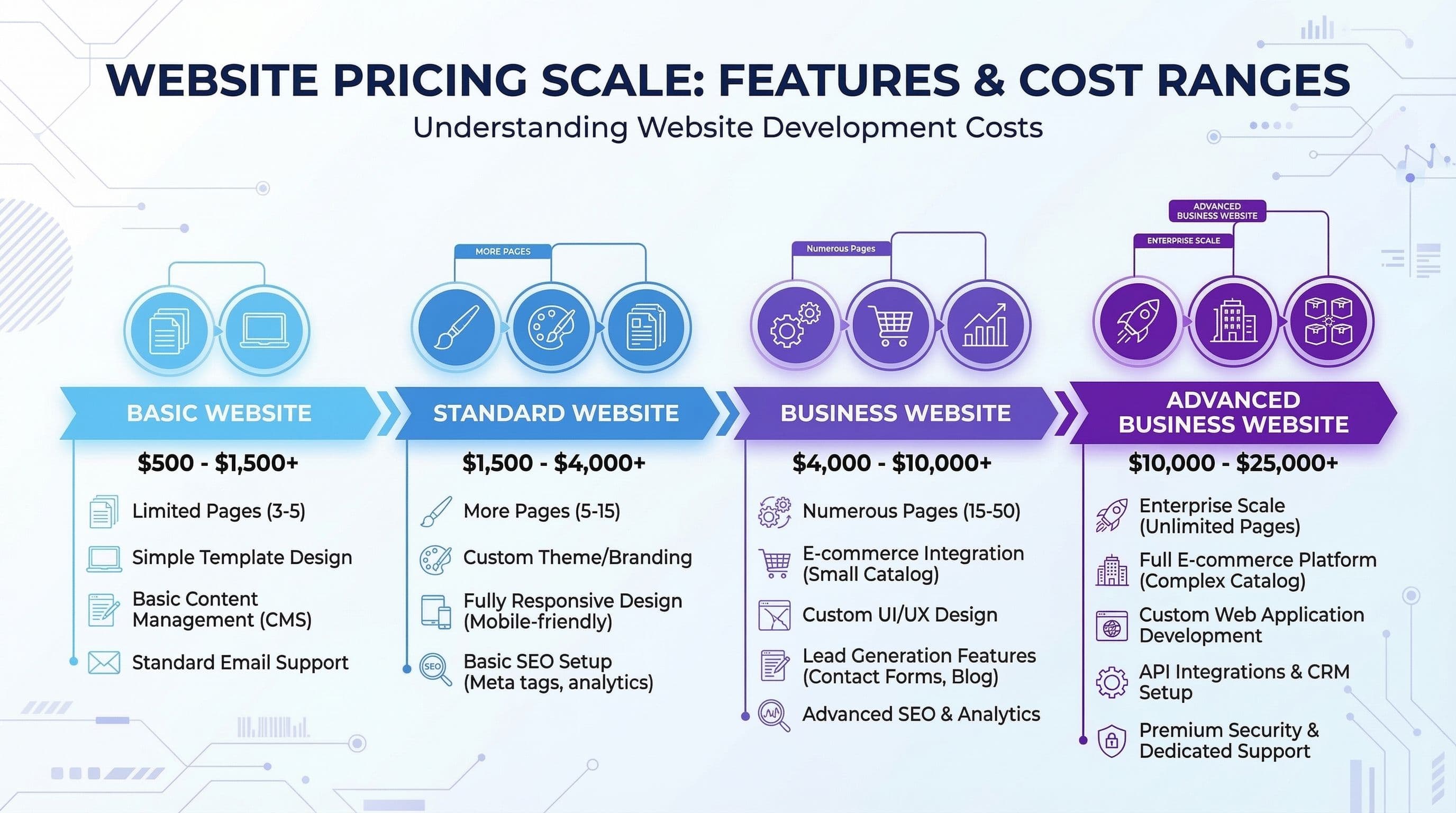
Upfront cost: $1,500 to $5,000 for a standard small business site. Strategy, design, and development billed separately or bundled.
What you get: A team rather than an individual. Dedicated project management, a design process, and typically a more polished visual output than a solo developer can deliver at the same pace. Post-launch support is usually structured into an ongoing retainer.
What you pay for beyond the work: Agency overhead. Office space, account management, sales team, and profit margin are all priced into the project fee. For a service business that needs a clean five-page site, agency pricing often reflects capacity that the project does not actually require.
Best for: An established business with budget, a complex site requirement, or a need for ongoing strategic support that goes beyond technical management.
Option 6 — Mid to Large Agency
Upfront cost: $5,000 to $25,000 and above. Custom design, custom development, content strategy, SEO architecture, and ongoing retainer.
What you get: Enterprise-level process, dedicated teams for design and development, formal project management, and a site built to a specification that a small agency or freelancer cannot match in complexity or polish.
What it is not: The right choice for a service business owner who needs a professional five-page site to generate leads. The pricing and process overhead is built for projects that justify it. Paying $10,000 for a site that a $500 fixed-price package would have served equally well is not a premium purchase. It is a mismatch between need and solution.
The WordPress Pricing Comparison Table
Use this reference to compare options side by side. The main risk column is where most buyers focus last and should focus first.
| Option | Typical Cost | Best For | Main Risk |
|---|---|---|---|
| DIY website builder (Wix, Squarespace) | $0 to $30/month | Absolute beginners | Limited SEO, no ownership, hard to scale |
| DIY WordPress | $100 to $300 one-time | Technical owners with time | Time cost, security gaps, poor configuration |
| Freelance developer (budget) | $300 to $800 | Simple brochure sites | Quality varies, no support after launch |
| Fixed-price WordPress package | $400 to $600 | Service businesses needing reliability | Limited scope, choose provider carefully |
| Agency (small) | $1,500 to $5,000 | Established businesses with budget | Overhead cost, long timelines |
| Agency (mid to large) | $5,000 to $25,000+ | Enterprise or complex builds | Budget, overkill for most small businesses |
How to Evaluate What You Are Actually Getting
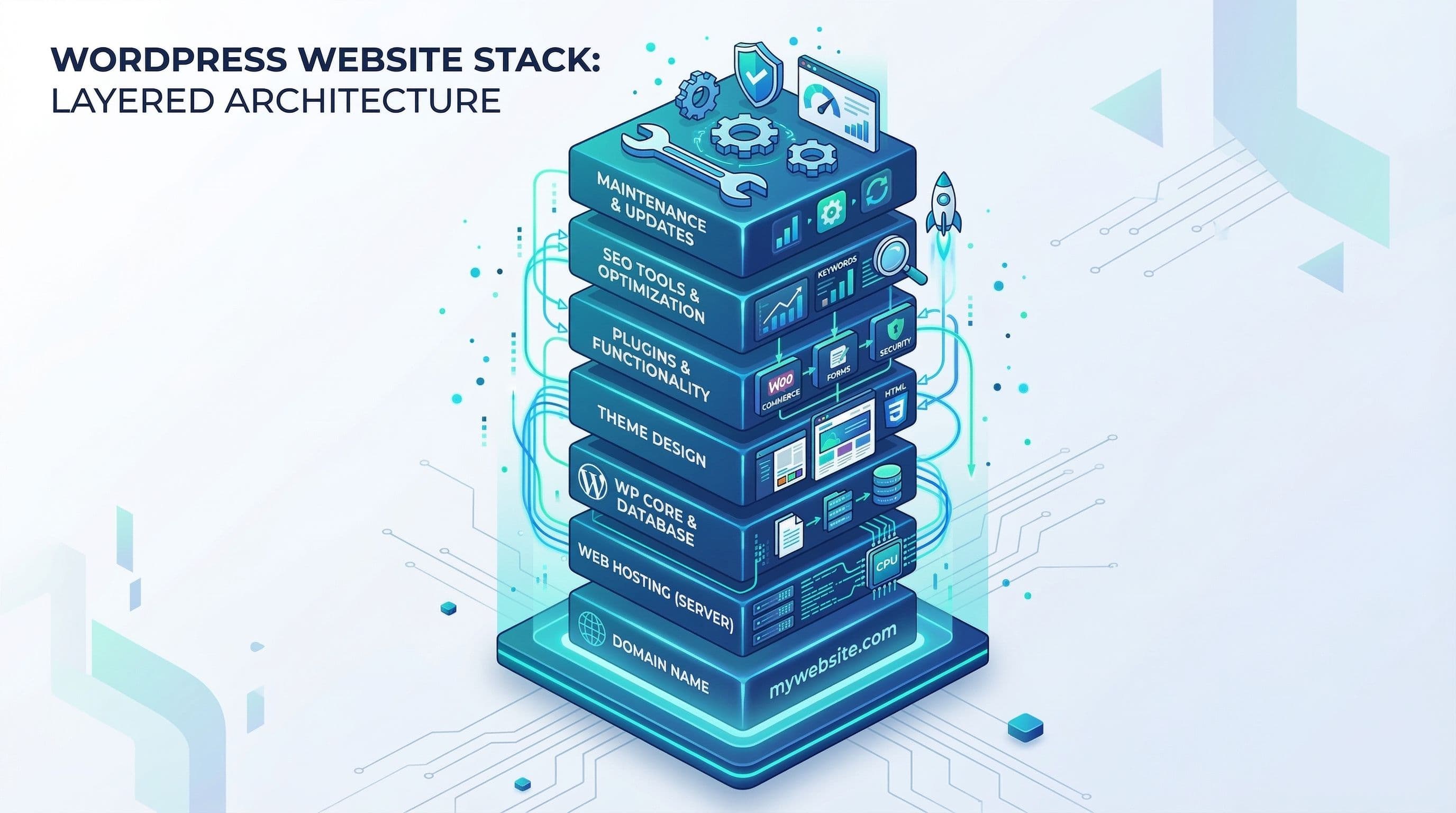
Step 1: Separate the Build Cost From the Ongoing Cost
What to do: Get two separate numbers from any provider. First, the one-time cost to build and deliver the site. Second, the ongoing monthly cost for hosting, maintenance, and support. These are different services with different price drivers. A $500 build with a $150 per month retainer costs $2,300 in year one. A $449 fixed-price build with a $20 per month hosting plan costs $689 in year one. Both produce a WordPress site. The ongoing cost structure is what determines the three-year total.
Why it matters: Many business owners compare build quotes without understanding that the ongoing cost structure will dwarf the upfront number over time. Get both numbers and calculate the 12-month and 36-month total before deciding.
Step 2: Confirm What Is Included After Launch
What to do: Ask explicitly what support and maintenance is included in the quoted price. How long after launch will the provider fix bugs at no charge. Are plugin updates included. Is there a support channel for questions. What happens if the site breaks in month three.
Why it matters: A site delivered without any post-launch support is a completed transaction, not an ongoing relationship. Knowing this upfront allows you to budget for hosting and maintenance separately rather than discovering the gap after launch.
Pro Insight:
The most useful question to ask any provider: what happens if my contact form stops working six weeks after launch? The answer reveals whether post-launch support is part of the engagement or a separate billable event.
Step 3: Ask What Happens to the Site If You Stop Paying
What to do: For any option that involves ongoing payments, understand what happens to the site if you stop. A website builder subscription: the site goes offline. An agency retainer: you typically retain the files but lose ongoing support. A hosted WordPress site on managed hosting you own: nothing changes, the site continues running and you manage it yourself.
Why it matters: Platform dependency is a real risk that many business owners discover too late. A site built on a platform you rent is not owned by you. A site on WordPress hosting you control is a permanent asset regardless of what happens to the provider relationship.
Step 4: Evaluate Whether the Price Reflects the Scope
What to do: Review the scope document or proposal carefully. Count the pages. Understand what custom design means versus a configured theme. Confirm whether copywriting is included. Clarify whether SEO setup is included. A $500 proposal that includes five pages, configured security, daily backups, and two rounds of revisions is different from a $500 proposal that includes theme installation and a homepage layout.
Why it matters: Price comparisons between providers are only meaningful when the scope is equivalent. A $300 site that includes three pages and no security configuration is not cheaper than a $449 site that includes five pages, full security setup, and daily backups. It is a different product.
Step 5: Compare the Cost Against the Value of One Client
What to do: Estimate the average value of one new client to the business. A consulting engagement at $2,000, a service retainer at $500 per month, a product sale at $150. Now calculate how many clients the site needs to generate in its lifetime to pay for itself at each price point.
Why it matters: A $449 WordPress site that generates one new client paying $500 has paid for itself. A $449 site that sits online without generating any leads has not. The investment decision is not about the cost of the site. It is about whether the site is built to generate leads and maintained to keep generating them. A cheap site that generates no leads is not a bargain.
Pro Insight:
The business owners I see spending the most on websites over time are the ones who paid the least upfront. A $200 freelance build that requires a $300 security cleanup, a $400 redesign at 18 months, and ongoing emergency fixes costs more over three years than a $449 professionally built site on managed hosting with proper maintenance in place from launch.
Common Mistakes That Turn a Cheap Site Into an Expensive Problem
Choosing a Price Without Understanding the Scope
The most common purchasing mistake in the WordPress market is comparing quotes by price without comparing them by scope. Two $400 proposals can represent radically different deliverables. Without a clear scope document itemizing exactly what is included, a price comparison is not a comparison at all. It is a guess about which provider will deliver more for the same number.
Ignoring Hosting Quality to Save $10 per Month
Budget shared hosting at $3 to $5 per month and managed WordPress hosting at $15 to $25 per month are not the same infrastructure at different price points. Budget hosting is oversold, slower, less secure, and harder to recover from when something goes wrong. The $10 to $15 per month difference in hosting cost has a disproportionate impact on site speed, security, and the overall reliability of every other configuration decision made on top of it.
Not Asking About Security and Backups
Most website pricing conversations focus entirely on design and pages. Security configuration, backup setup, and maintenance infrastructure are almost never mentioned unless the buyer raises them. A site delivered without a security plugin configured, without daily backups running, and without uptime monitoring is a site that is one incident away from a repair bill that exceeds what the original build cost. Ask about these before signing any agreement.
Rebuilding Every Two Years Instead of Maintaining
The most expensive way to have a WordPress site is to build a cheap one, neglect maintenance, let it become outdated and problematic, rebuild it cheaply, and repeat the cycle. This pattern is extremely common and extremely costly over time. A properly built site maintained consistently does not need to be rebuilt. It needs a weekly 15-minute update check and annual review. The rebuild cycle is a symptom of underinvestment in the initial build and ongoing maintenance.
What a $449 WordPress Website Actually Includes
For context, this is what the fixed-price package at this price point covers for a service business site:
- Five pages: Home, About, Services, Contact, and one additional page
- Professional WordPress theme configured to the business brand
- Managed hosting setup on a quality server with server-level WAF
- SSL active and forced across all pages
- Security plugin configured with Extended Protection firewall and weekly malware scans
- Login hardened with 2FA, custom URL, and XML-RPC disabled
- Daily automated backups to Google Drive with 30-day retention
- Uptime monitoring active with email and SMS alerts
- Contact form set up and tested
- Basic on-page SEO: title tags, meta descriptions, heading structure
- Mobile responsive across all major devices and browsers
- Google Analytics connected
This is what a service business site should include at minimum before it goes live. The $449 price point exists because this work does not require agency overhead, a project manager, a sales team, or a downtown office. It requires one developer who knows exactly what a service business site needs and builds it the same way every time.
Don't Have Time to Deal With This?
If you have been putting off the website decision because the pricing landscape felt too confusing to navigate confidently, this guide was built to solve that problem.
The $449 Website Package is a fixed-price, defined-scope build for service business owners who want a professional site without the agency price tag or the freelance uncertainty. One price. One clear scope. One developer who does this work every week.
No discovery calls that go nowhere. No proposals that come back double the budget. No rebuilds 18 months later because the first version was not built properly.
About the Author
Sheikh Hassaan — Website Developer for Small Businesses
I help service businesses launch fast, secure, conversion-focused WordPress websites without the agency price tag. I've built sites for coaches, consultants, local service providers, and founders who need something professional that actually works — not a DIY project that becomes a second job.
Related Articles
- When It Makes Sense to Hire Someone to Manage Your WordPress Website
- Is a WordPress Maintenance Service Worth It for a Small Business? (Honest Breakdown)
- WordPress Security for Small Business Websites: The Complete Plain-English Guide
Frequently Asked Questions
How much should a small business WordPress website cost in 2026?
A professionally built WordPress website for a small service business should cost between $400 and $800 from a freelance developer or fixed-price provider. DIY options cost $100 to $300 in tools but carry significant time cost. Agency builds start at $1,500 and scale to $5,000 or more depending on scope and overhead.
Is it cheaper to build a WordPress site yourself?
In upfront fees, yes. In total cost including your time, usually not. A business owner spending 30 to 50 hours building a WordPress site has paid the equivalent of a professional build in opportunity cost. DIY is only genuinely cheaper if your time has no alternative productive use during those hours.
What is included in a typical WordPress website package?
A quality fixed-price WordPress package for a small business includes site design and build on five to seven pages, hosting setup, SSL, a configured security plugin, daily backups, a contact form, basic SEO setup, and mobile responsiveness. Packages that include only theme installation and a homepage layout are not equivalent to this scope regardless of similar pricing.
Why do WordPress websites vary so much in price?
Because WordPress website covers everything from a simple five-page site to a complex custom platform. Price also reflects the provider's overhead: an agency with staff and office space charges more than a solo developer with the same skills. Comparing prices without comparing scope and provider overhead produces misleading conclusions.
Is a $500 WordPress website good quality?
Yes, if it is built by a developer who does this work consistently and includes proper security, backups, and hosting setup in the scope. A $500 site from a developer with a clear process and a portfolio of similar work is often better built than a $2,000 site from a generalist agency that treats small business sites as low-priority projects.